Yigcore · design-partner pilot
Next month's report should not start from zero.
A local workbench for recurring Excel work: workbooks updated period after period, by people who answer for the numbers. Carry your confirmed setup forward, review what changed, and let Excel compute. The first pilots run on monthly finance reporting.
Your project stays local. Connected AI has its own data boundary.
Yigcore has no analytics or telemetry. Your project, its history and its usage record stay in the .yig. Diagnostics are exported only when you choose, and contain counts and states, never your data. When you connect an AI assistant, permitted context is shared with its host and model provider under their terms. This website uses separate audience analytics, described in the privacy policy. Product connections are to your own AI assistant and, when enabled, a version check. Excel loads its add-in runtime from Microsoft.
 ▶ Explore the workflow · 82 seconds Simulation on synthetic data · current capabilities below Last month Confirm the mapping This month Review the new exception
The value is not another approval step.
It is carrying forward what you already established.
So the next update does not become another rebuild. In the film's synthetic scenario the second month brings a cost centre that Master Data does not list. The goal of the loop: what was already decided is reused, the one new item is singled out, a person decides it, Excel recalculates, and the month is recorded to continue from. Which parts of that loop already run, and which are still being validated, is listed below, not assumed here.
Interactive simulation, not the installed product. Synthetic workbooks and scripted outcomes. Full workflow automation, decision reuse, concept views and Codex handover are still under validation. See current capabilities.
Three moments the pilot measures
The pilot tests these three outcomes with your periods. The film shows all
three on synthetic data: what Yigcore reads in your workbooks, a month run with Claude that stops for
one decision, and the same .yig handed to the next person, who runs the next month with Codex.
Read the film as text
- 0:00 Next month’s report should not start from zero. Eighteen workbooks, as they sit on a drive today.
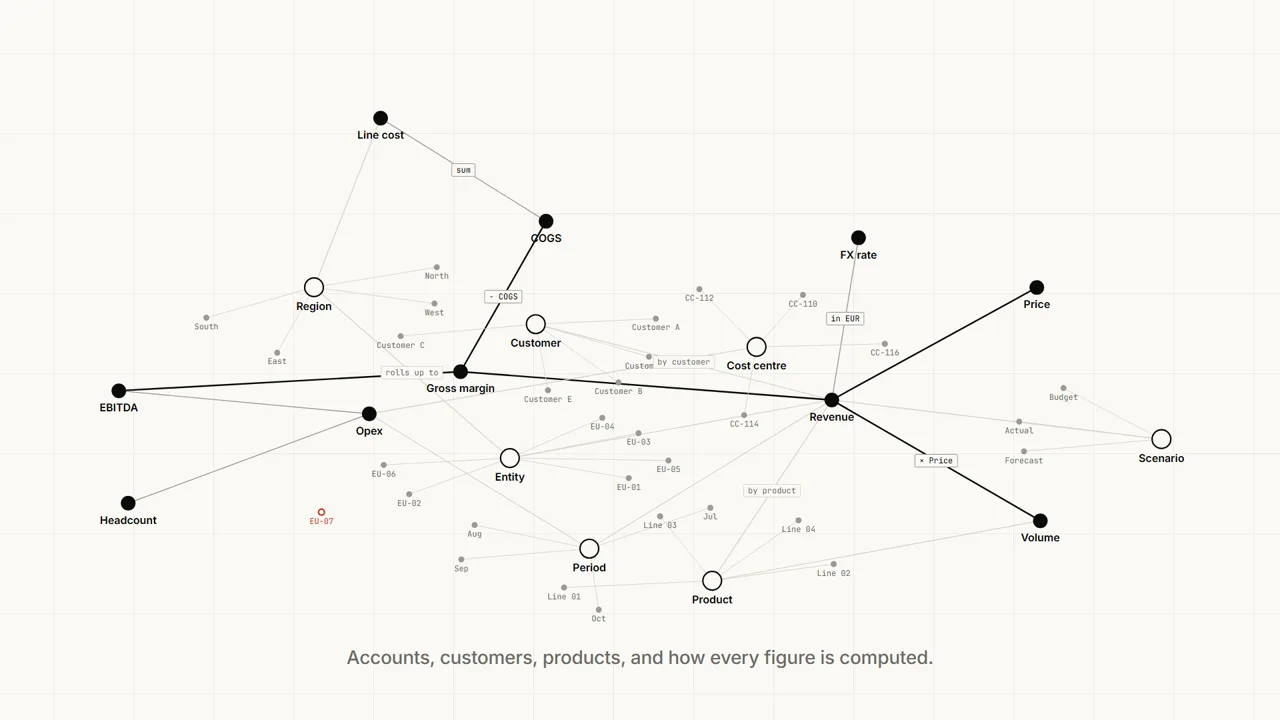
- 0:04 Yigcore reads what is inside them: accounts, customers, products, and how every figure is computed. Volume × Price → Revenue − COGS → Gross margin − Opex → EBITDA.
- 0:09 One thing does not fit: entity EU-07 is in the regional sales data but not in Master Data.
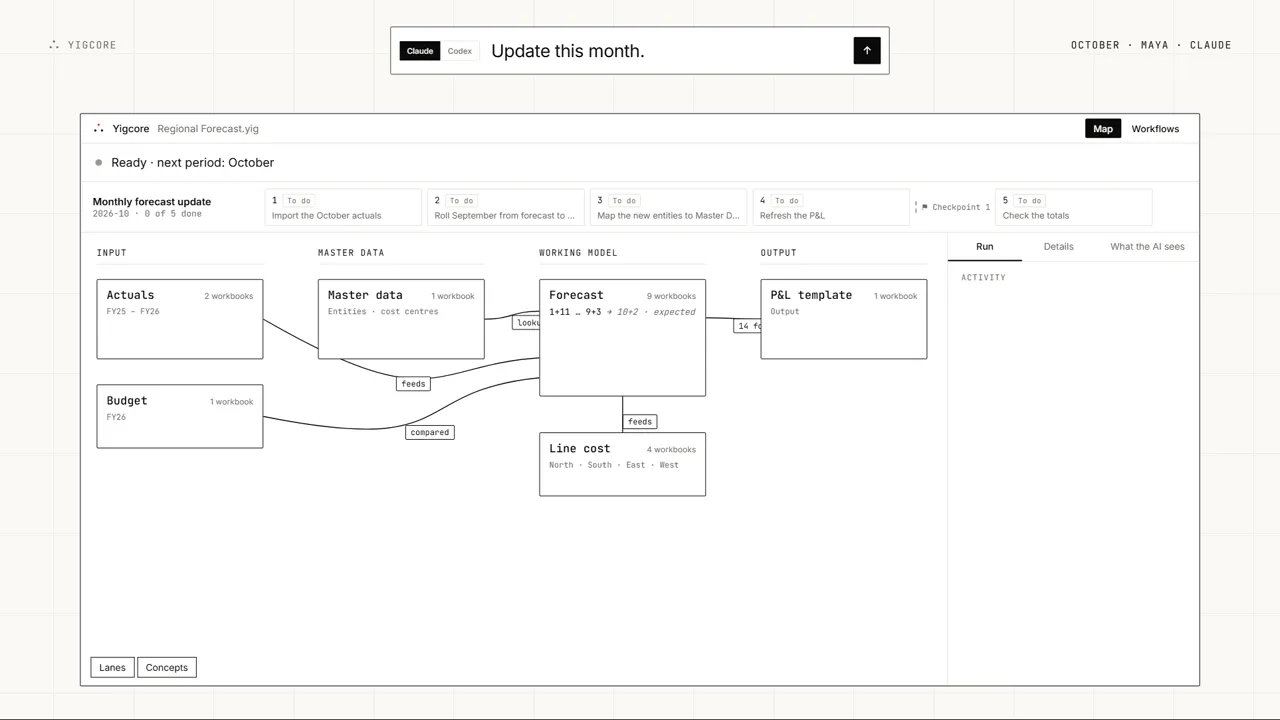
- 0:11 And where each one lives in your workbooks: Input, Master data, Working model, Output.
- 0:14 The map you see is the map the agent reads. Select Forecast: the agent gets its role, versions and links, never a cell value.
- 0:20 And it runs the month-end that flows through them: five steps, one checkpoint.
- 0:23 October. Maya asks Claude: “Update this month.”
- 0:26 Step 2 writes 46 cells as a draft. Excel computes every figure; Yigcore never guesses one. The totals recalculate in Excel.
- 0:32 Yigcore stopped to ask: EU-07 is not in Master Data. It stopped instead of guessing. Maya maps it to EU-04 Iberia.
- 0:38 You review once, in Excel: two drafts, 72 cells, every check passed. Maya accepts.
- 0:42 The October run is recorded: every step, period by period, with its evidence.
- 0:46 Hand it to the next person. They do not need the whole story again: the map, the workflow, the decision and the history are in the file.
- 0:53 November. Leo asks Codex the same sentence. Same workflow, same file, another agent.
- 0:58 EU-07 is mapped as Maya decided in October. Only the new item asks: cost centre CC-118. Leo adds it to Master Data.
- 1:04 Leo reviews three drafts in Excel and accepts. The November run is recorded.
- 1:11 Any agent. Any month. Excel computes. You decide. Yigcore, coming soon.
Explore the simulated month
Try the same synthetic scenario. This preview does not open Excel, connect an agent, or process your files. Click a dataset, open the concept graph and drag it, open Excel and click a cell, then send the sentence. The run stops when it needs your decision and waits for your review in Excel.
Preview could not load. or watch the film above.
The interactive preview needs a wider screen. The film above shows the same month.
Your project stays local. Connected AI has its own data boundary.
Yigcore has no analytics or telemetry. Your project, its history and its usage record stay in the .yig. Diagnostics are exported only when you choose, and contain counts and states, never your data. When you connect an AI assistant, permitted context is shared with its host and model provider under their terms. This website uses separate audience analytics, described in the privacy policy. Product connections are to your own AI assistant and, when enabled, a version check. Excel loads its add-in runtime from Microsoft.
What stays with your work?
What you keep and hand on is a .yig file: a piece of work that can be maintained,
not just this run's output.
- The map: your datasets, the workbooks in each, their formula links and the relations you confirmed.
- The workflow: its steps, its checkpoints, and what each step reads and writes.
- Every recorded decision: what was asked, who decided, what it affected.
- The history: each accepted draft, period by period, with its evidence.
Your workbooks stay your workbooks. Yigcore references them, writes only input cells and only into draft copies, and a draft becomes the working copy only when a person accepts it. When a file it needs is missing, Yigcore stops and says so rather than guessing.
What works today, what is still being validated
Runs on the installed build
- Opening a project as a map: datasets, versions, formula links and the problems found, and the same map as the agent reads it.
- An edit written into draft copies, recalculated by Excel, reviewed in Excel with its cells and checks, and accepted once, with a history entry.
- Following your workbooks after rows are inserted or labels renamed, or saying plainly where it cannot.
Under validation in the pilot
- Replaying a closed period against its files before confirming a workflow.
- A whole workflow run for a new period: starting when the files arrive, stopping for a person's decision and at each checkpoint.
- Reusing last period's decisions so that only the new items ask.
- The concept view of the map: accounts, customers, products and how each figure is computed.
- Agent hosts beyond Claude Desktop, starting with Codex, and handover to a second operator without founder assistance.
The pilot is an exchange
What we ask
- Two adjacent past periods of one recurring report, in the workbook you actually use.
- One independent control total per period, prepared before we import anything.
- Thirty minutes a week with the founder for the length of the pilot.
What you get
- A first assessment of whether your data and process fit the supported scope, before any time is spent.
- If they fit, a supported sample built together on your own periods.
- A before-and-after comparison of the manual effort in your update, measured, not estimated.
- A written record of every step the product could not complete, and what would be needed.
Before you commit, the assessment establishes the supported Excel environment, the pilot duration and a written success criterion: compare manual effort across your two periods and record each remaining manual step.
Publishing what we learn is separate from taking part. Nothing about your pilot is published without your review of the exact, value-free text first.
Apply for the pilot
A few questions so we know whether your report, and the effort it costs you, fit the pilot.
Not ready to apply?
Does Yigcore replace Excel?
Every figure is computed by Excel, in your own workbooks and formulas. Yigcore locates, reads and compares cells; it keeps no second calculation of its own.
Yigcore and the agent write only input cells, into draft copies. You review the effect in Excel and accept it; until then your working files do not change.
The agent proposes and runs the workflow, Yigcore stops where it should not guess, Excel computes, and you decide. That is the safeguard behind the outcomes above, not the reason to switch.
Technical and security notes
What is Yigcore?
Yigcore is a local workbench for recurring Excel work on Windows: workbooks that are updated period after period, by people who answer for the numbers. It reads how your workbooks connect into a map, keeps the workflow and every decision in one .yig file, runs the month with the agent host you choose, stops where a person has to decide, and lets Excel compute every figure. It is not tied to one business domain; the first pilots run on monthly finance reporting. It is in a design-partner pilot; there is no public download yet.
Does Yigcore replace Excel?
No. Every figure is computed by Excel, in your own workbooks and formulas; Yigcore keeps no second calculation of its own. Yigcore and the agent write only input cells, into draft copies, and you review and accept the change in Excel before your working files change.
What is a .yig file?
The project file you keep and hand on. It holds the map of your workbooks and their links, the workflow with its checkpoints, every recorded decision and the history of accepted drafts, period by period. It references your workbooks rather than replacing them, so the next person can continue without the whole story.
Which AI agents work with Yigcore?
Yigcore exposes a local MCP server, and the pilot validates agent hosts one by one: Claude Desktop first, Codex next. Yigcore holds no model and no API key; the agent you connect reads only what you allow, under its provider's terms.
Do I need an agent to use Yigcore?
No. Yigcore runs on Windows on its own: you can open a project, read the map, and review and accept drafts in Excel without any agent present. Agent-assisted workflows, through MCP-compatible desktop hosts such as Claude Desktop (Codex is next), are an enhancement the pilot validates host by host.
Where does my data go?
Yigcore stores your project locally, Excel computes on your computer, and Yigcore’s own logs carry no workbook values. If you connect an agent host, the context you permit is shared with that host and its model provider under that provider’s terms. Yigcore holds no model and no API key of its own.
What does "replay" actually cover?
Replay is under validation for the pilot. The intended check is to run a workflow against the last closed period’s files and compare the result cell by cell, using Excel for the calculations. The simulation illustrates this check; it does not establish that the installed integration is ready.
Why can I not download it today?
Because the smallest real period-update loop has not yet passed our own acceptance gate on the installed build. Until it does, the honest offer is a founder-led pilot, and this page lists which parts run today and which are still under validation.
Jerome Gao, founder